
Acthar Enrollment Form – Download Free Fillable PDF
|
Form Name: |
Category: |
Page Count: |
File Format: |
|---|---|---|---|
|
Acthar Enrollment Form |
Patient Support Program |
07 Pages |
PDF, Fillable PDF |
Acthar Enrollment Form
Patients starting Acthar Gel treatment must complete the required enrollment document to begin processing. The form gathers required prescriber, patient, insurance, and authorization information, helping support team verify coverage, coordinate delivery, and review eligibility for assistance programs. It ensures all information is submitted in a single, organized format, keeping the treatment process moving and reducing delays. If you’re preparing to start treatment, download, fill out, or submit the Acthar enrollment form today.
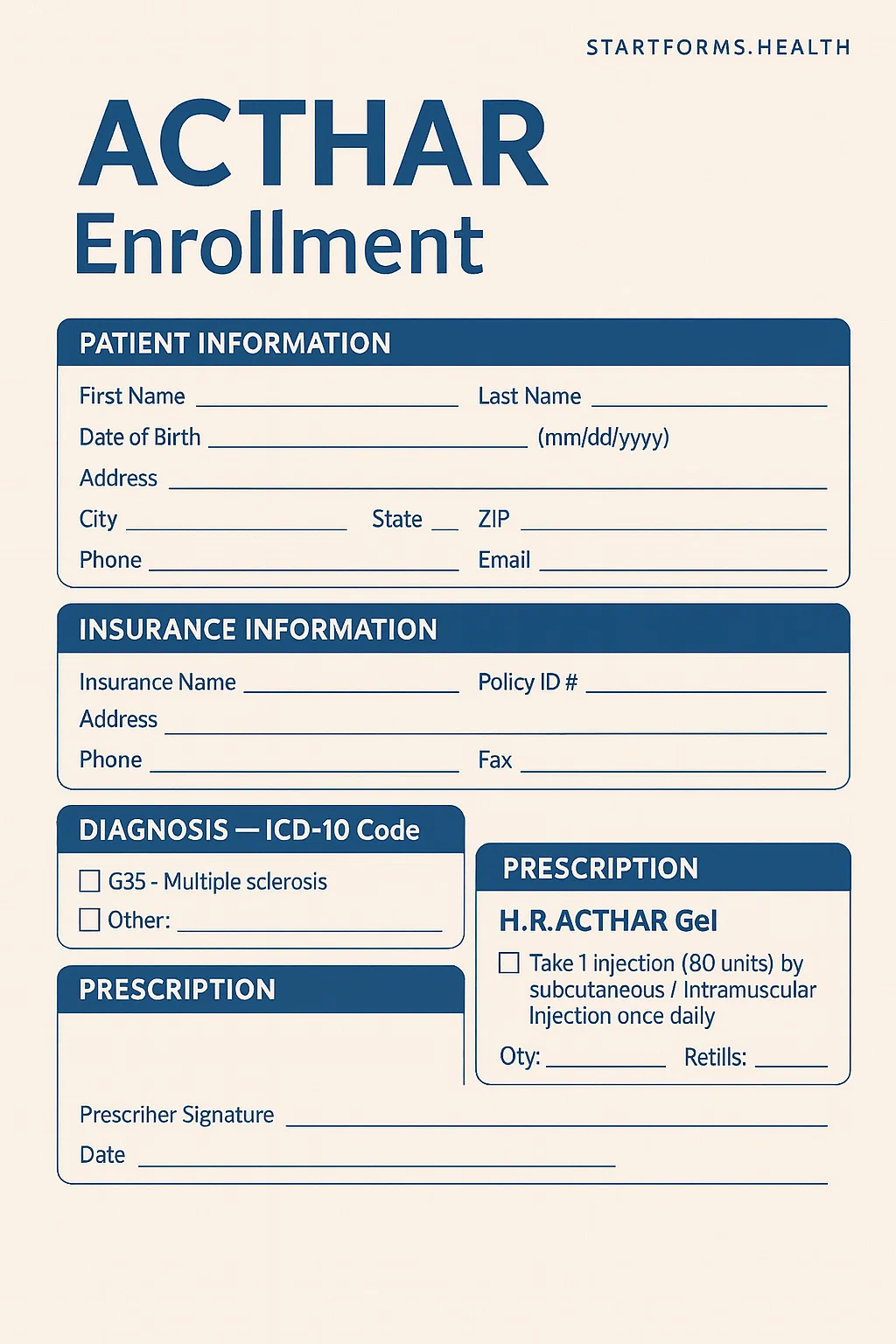
Form Preview
Benefits of The Acthar Enrollment Form
Complete Insurance Verification
The enrollment form authorizes the support team to contact insurers, verify benefits, identify prior authorization requirements, and assess potential out-of-pocket costs.
Access to The Commercial Starter Program
Eligible patients with commercial insurance may qualify for a starter supply. The Acthar enrollment form includes a section for prescribers to request this option, ensuring that qualified patients can start treatment while the insurance process is still underway.
Reduced Administrative Workload
Because the form consolidates everything needed for therapy initiation, clinics save time on follow-ups, missing details, and resubmission requests. This led to a smoother workflow.
Key Sections of The Acthar Patient Form
Patient Details
The section includes the patient’s name, address, gender, email ID, language preferences, and contact details.
Insurance Details
It describes the pharmacy benefit provider and primary medical insurance, including name, address, phone number, and subscriber number.
Prescriber Section
This section contains prescribers’ information, including their HCP name, specialty, state license number, NPI & tax ID, and office contact details.
Prescription
It includes required dose selection, vial size, frequencies, refills, quantities, etc.
Diagnosis ICD-10 Codes
This form includes checkboxes for common conditions treated with Acthar Gel, as well as a dedicated field to enter additional ICD-10 codes.
Commercial Started Program
The prescriber may confirm eligibility and request a starter supply for eligible patients.
How To Complete The Fillable Acthar Enrollment Form?
Patient Details: Enter the patient’s full name, complete mailing address, date of birth, email address, language preference, gender, any known allergies, and caregiver details.
Insurance Information: Fill in the pharmacy benefit provider and primary medical insurance details, including subscriber numbers, group numbers, and phone numbers. Also, attach the front and back copies of the patient’s prescription benefit and insurance cards.
Prescriber Information: Write the HCP name, specialty, complete address, state license number, NPI number, tax ID, and office contact details.
Prescription Information: Choose the appropriate Acthar Gel dose, vial size, frequency, number of vials, refills, etc.
Commercial Starter Program: Choose the appropriate diagnosis from the list. If the condition is not listed on the form, enter the ICD-10 code manually. Additionally, if the patient is commercially insured and meets the qualifying criteria, the prescriber may request the starter supply.
Prescriber Signature: The prescriber must sign and date the form.
Patient Authorization & Consent: The patient must read, understand, and sign all authorization statements.
Download Acthar Enrollment Form PDF
Choose your preferred format and download instantly
Frequently Asked Questions
What is the Acthar enrollment form used for?
It is used to collect all information needed to start processing Acthar Gel therapy. This includes patient details, prescriber information, diagnosis codes, insurance documentation, etc. Submitting the form accurately allows the support team to verify benefits, coordinate pharmacy services, review assistance program eligibility, and move the treatment request forward.
Why is insurance information required?
Insurance details are required to verify coverage, confirm benefits, and determine whether additional documentation, such as prior authorization is required.
Can it help determine eligibility for copay support or financial assistance?
Of course, once the form is submitted, the program can review the patient’s insurance status and financial information to determine eligibility for copay assistance programs, starter supply options, or other patient support services.
Do I need to include insurance documents?
Yes. The form requires both the front and back copies of the active medical and pharmacy insurance cards to verify coverage.
Can the form be filled out electronically?
Of course, this form is designed for electronic completion before printing or signing.